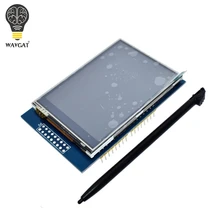
I recently started looking through various shields I had no articles, code or tutorials for and came across a 2.8 Inch TFT LCD Shield Touch Display Screen Module For Arduino
Its a cracking display, here are some pictures of it
Features:
2.8 inch LCD TFT display
Bright, 4 white-LED backlight
Colorful, 18-bit 262,000 different shades
4-wire resistive touchscreen 240 x 320 pixels with individual pixel control
No wiring, no soldering.
Simply plug it in and load library
On-board 3.3V 300mA LDO regulator
5V compatible, use with 3.3V or 5V logic
Support 2GB micro SD TF card
Size: 7.8 x 5.3cm
Parts List
Code
I connected the shield to an Arduino Mega
4 libraries are required with the code example that I tested with – I uploaded these to my github site
[codesyntax lang=”cpp” lines=”fancy”]
// IMPORTANT: Adafruit_TFTLCD LIBRARY MUST BE SPECIFICALLY
// CONFIGURED FOR EITHER THE TFT SHIELD OR THE BREAKOUT BOARD.
// SEE RELEVANT COMMENTS IN Adafruit_TFTLCD.h FOR SETUP.
//Technical support:goodtft@163.com

#include <Adafruit_GFX.h>    // Core graphics library
#include <Adafruit_TFTLCD.h> // Hardware-specific library

// The control pins for the LCD can be assigned to any digital or
// analog pins...but we'll use the analog pins as this allows us to
// double up the pins with the touch screen (see the TFT paint example).
#define LCD_CS A3 // Chip Select goes to Analog 3
#define LCD_CD A2 // Command/Data goes to Analog 2
#define LCD_WR A1 // LCD Write goes to Analog 1
#define LCD_RD A0 // LCD Read goes to Analog 0

#define LCD_RESET A4 // Can alternately just connect to Arduino's reset pin

// When using the BREAKOUT BOARD only, use these 8 data lines to the LCD:
// For the Arduino Uno, Duemilanove, Diecimila, etc.:
//   D0 connects to digital pin 8  (Notice these are
//   D1 connects to digital pin 9   NOT in order!)
//   D2 connects to digital pin 2
//   D3 connects to digital pin 3
//   D4 connects to digital pin 4
//   D5 connects to digital pin 5
//   D6 connects to digital pin 6
//   D7 connects to digital pin 7
// For the Arduino Mega, use digital pins 22 through 29
// (on the 2-row header at the end of the board).

// Assign human-readable names to some common 16-bit color values:
#define  BLACK   0x0000
#define BLUE    0x001F
#define RED     0xF800
#define GREEN   0x07E0
#define CYAN    0x07FF
#define MAGENTA 0xF81F
#define YELLOW  0xFFE0
#define WHITE   0xFFFF

#include <MCUFRIEND_kbv.h>
MCUFRIEND_kbv tft;
// If using the shield, all control and data lines are fixed, and
// a simpler declaration can optionally be used:
// Adafruit_TFTLCD tft;

void setup(void) {
  Serial.begin(9600);
  Serial.println(F("TFT LCD test"));

#ifdef USE_ADAFRUIT_SHIELD_PINOUT
  Serial.println(F("Using Adafruit 2.4\" TFT Arduino Shield Pinout"));
#else
  Serial.println(F("Using Adafruit 2.4\" TFT Breakout Board Pinout"));
#endif

  Serial.print("TFT size is "); Serial.print(tft.width()); Serial.print("x"); Serial.println(tft.height());

  tft.reset();

  uint16_t identifier = tft.readID();
  if(identifier == 0x9325) {
    Serial.println(F("Found ILI9325 LCD driver"));
  } else if(identifier == 0x9328) {
    Serial.println(F("Found ILI9328 LCD driver"));
  } else if(identifier == 0x4535) {
    Serial.println(F("Found LGDP4535 LCD driver"));
  }else if(identifier == 0x7575) {
    Serial.println(F("Found HX8347G LCD driver"));
  } else if(identifier == 0x9341) {
    Serial.println(F("Found ILI9341 LCD driver"));
  }else if(identifier == 0x7783) {
    Serial.println(F("Found ST7781 LCD driver"));
  }else if(identifier == 0x8230) {
    Serial.println(F("Found UC8230 LCD driver"));
  }
  else if(identifier == 0x8357) {
    Serial.println(F("Found HX8357D LCD driver"));
  } else if(identifier==0x0101)
  {
      identifier=0x9341;
       Serial.println(F("Found 0x9341 LCD driver"));
  }else {
    Serial.print(F("Unknown LCD driver chip: "));
    Serial.println(identifier, HEX);
    Serial.println(F("If using the Adafruit 2.8\" TFT Arduino shield, the line:"));
    Serial.println(F("  #define USE_ADAFRUIT_SHIELD_PINOUT"));
    Serial.println(F("should appear in the library header (Adafruit_TFT.h)."));
    Serial.println(F("If using the breakout board, it should NOT be #defined!"));
    Serial.println(F("Also if using the breakout, double-check that all wiring"));
    Serial.println(F("matches the tutorial."));
    identifier=0x9341;

  }

  tft.begin(identifier);


}

void loop(void) {
   tft.fillScreen(BLACK);
  unsigned long start = micros();
  tft.setCursor(0, 0);

  tft.setTextColor(RED);  tft.setTextSize(1);
  tft.println("Hello World!");
  tft.println(01234.56789);
  tft.println(0xDEADBEEF, HEX);
  tft.println();
  tft.println();
  tft.setTextColor(GREEN); tft.setTextSize(2);
   tft.println("Hello World!");
  tft.println(01234.56789);
  tft.println(0xDEADBEEF, HEX);
  tft.println();
  tft.println();

  tft.setTextColor(BLUE);    tft.setTextSize(3);
   tft.println("Hello World!");
  tft.println(01234.56789);
  tft.println(0xDEADBEEF, HEX);

  tft.setTextColor(WHITE);    tft.setTextSize(4);
   tft.println("Hello!");
   tft.setTextColor(YELLOW);    tft.setTextSize(5);
   tft.println("Hello!");
   tft.setTextColor(RED);    tft.setTextSize(6);
   tft.println("Hello!");
  tft.println();
  tft.println();
  /*
  tft.println();
  tft.setTextColor(GREEN);
  tft.setTextSize(5);
  tft.println("Groop");
  tft.setTextSize(2);
  tft.println("I implore thee,");
  tft.setTextSize(1);
  tft.println("my foonting turlingdromes.");
  tft.println("And hooptiously drangle me");
  tft.println("with crinkly bindlewurdles,");
  tft.println("Or I will rend thee");
  tft.println("in the gobberwarts");
  tft.println("with my blurglecruncheon,");
  tft.println("see if I don't!");*/
  delay(1000);delay(1000);delay(1000);delay(1000);delay(1000);
}
[/codesyntax]
