
2.9K
In a previous example we took a look at the HDC1008 – http://www.arduinolearning.com/code/hdc1008-sensor-example.php
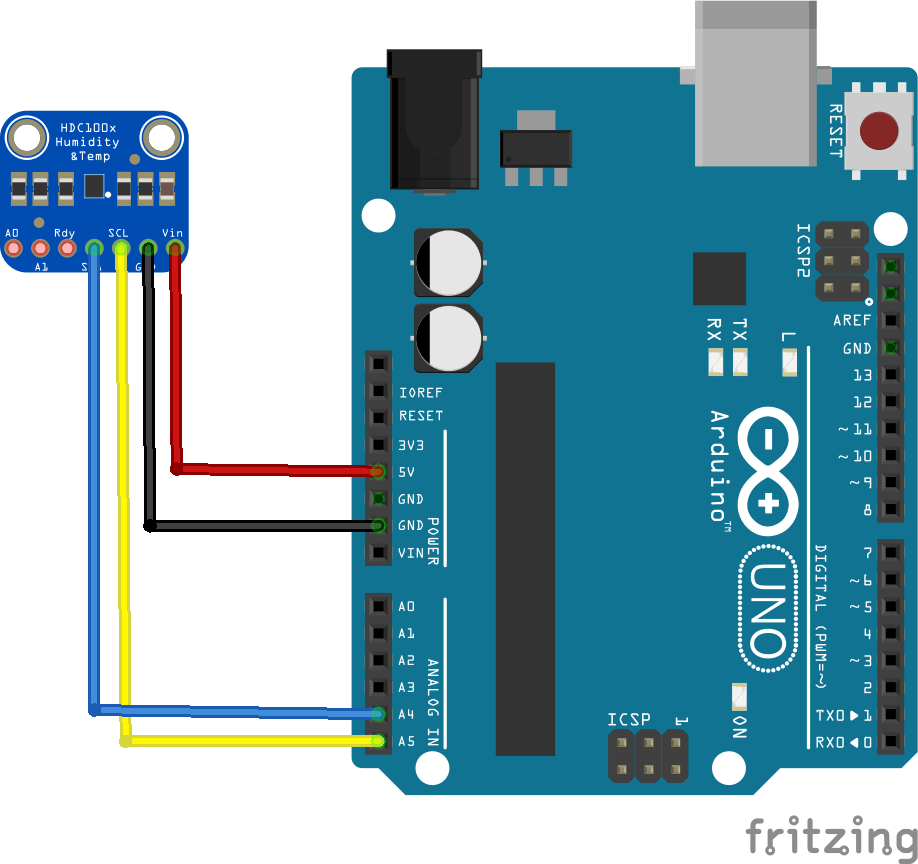
This example used a library from Adafruit but we wanted to show you how to do the same thing with no libraries., here is a reminder of how to connect the HDC1008 to your Arduino
Layout
Code
[codesyntax lang=”python”]
#include<Wire.h>

// HDC1008 I2C address is 0x40(64)
#define hdcAddr 0x40

void setup()
{
  Wire.begin();
  Serial.begin(9600);

  // Starts I2C communication
  Wire.beginTransmission(hdcAddr);
  // Select configuration register
  Wire.write(0x02);
  // Temperature, humidity enabled, resolultion = 14-bits, heater on
  Wire.write(0x30);
  // Stop I2C Transmission
  Wire.endTransmission();
  delay(300);
}

void loop()
{
  unsigned int data[2];

  Wire.beginTransmission(hdcAddr);
  // Send temp measurement command
  Wire.write(0x00);
  Wire.endTransmission();
  delay(500);

  // Request 2 bytes of data
  Wire.requestFrom(hdcAddr, 2);

  // Read 2 bytes of data for temperature
  if (Wire.available() == 2)
  {
    data[0] = Wire.read();
    data[1] = Wire.read();
  }

  int temp = (data[0] * 256) + data[1];
  float celsTemp = (temp / 65536.0) * 165.0 - 40;
  float fahrTemp = celsTemp * 1.8 + 32;


  Wire.beginTransmission(hdcAddr);
  // Send humidity measurement command
  Wire.write(0x01);
  Wire.endTransmission();
  delay(500);

  // Request 2 bytes of data
  Wire.requestFrom(hdcAddr, 2);
  // Read 2 bytes of data to get humidity
  if (Wire.available() == 2)
  {
    data[0] = Wire.read();
    data[1] = Wire.read();
  }

  // Convert the data
  float humidity = (data[0] * 256) + data[1];
  humidity = (humidity / 65536.0) * 100.0;

  Serial.print("Humidity : ");
  Serial.print(humidity);
  Serial.println(" %RH");
  Serial.print("Celsius : ");
  Serial.print(celsTemp);
  Serial.println(" C");
  Serial.print("Fahrenheit : ");
  Serial.print(fahrTemp);
  Serial.println(" F");
  delay(500);
}
[/codesyntax]
Links
HDC1008 Temperature Humidity Sensor Breakout Board for Arduino
