
In this example we use the DHT22 (or AM2302) humidity/temperature sensor and the Arduino UNO board to read data and print it out to the serial monitor.
The DHT22 is better than the DHT11 because it has a wider range of measurement, 0 to 100% for humidity and -40°C to +125°C for temperature. Also it has a digital output that provides greater data accuracy.
DHT22 output calibrated digital signal. It utilizes exclusive digital-signal-collecting-technique and humidity sensing technology, assuring its reliability and stability.Its sensing elements is connected with 8-bit single-chip computer.
Every sensor of this model is temperature compensated and calibrated in accurate calibration chamber and the calibration-coefficient is saved in type of programme in OTP memory, when the sensor is detecting, it will cite
coefficient from memory.
Small size & low consumption & long transmission distance(20m) enable DHT22 to be suited in all kinds of application conditions.
Schematic/layout
I used a breakout but here is how to wire the device to your Arduino Uno
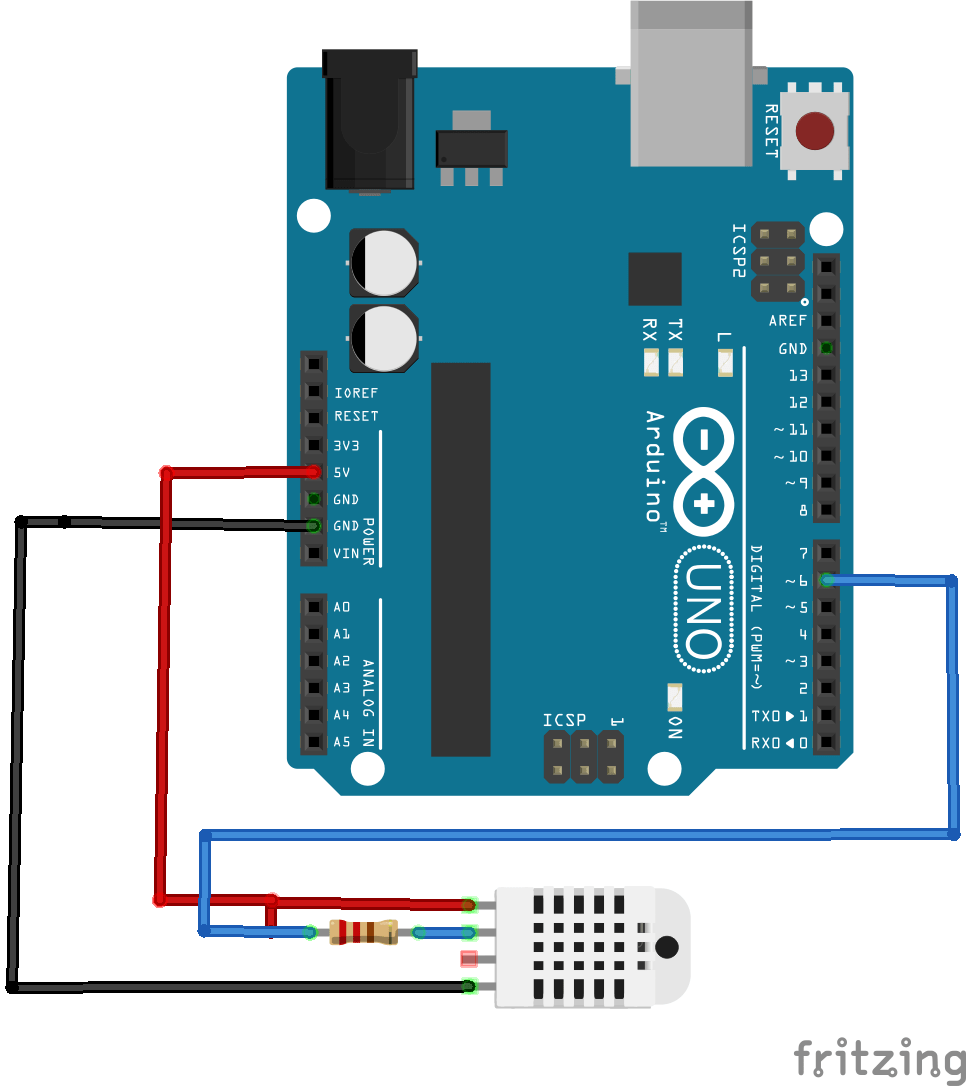
uno and dht22
Code
I used an older version of the adafruit library prior to them introducing the Unified sensor library – https://github.com/adafruit/DHT-sensor-library/tree/1.2.0
[codesyntax lang=”cpp”]
#include "DHT.h"

#define DHTPIN 6     // what pin we're connected to
#define DHTTYPE DHT22   // DHT 22  (AM2302)


DHT dht(DHTPIN, DHTTYPE);

void setup()
{
  Serial.begin(9600);
  dht.begin();
}

void loop()
{
  // Wait a few seconds between measurements.
  delay(2000);

  float hum = dht.readHumidity();
  // Read temperature as Celsius
  float tempC = dht.readTemperature();

  // Check if readings have failed
  if (isnan(hum) || isnan(tempC))
  {
    Serial.println("Failed to read from DHT sensor!");
    return;
  }

  Serial.print("Humidity: ");
  Serial.print(hum);
  Serial.print(" %\t");
  Serial.print("Temperature: ");
  Serial.print(tempC);
  Serial.println(" *C ");

}
[/codesyntax]
Links
DHT22 Digital Humidity AM2302 and Temperature Sensor Module
